Open the details of a listing in MarketBuddy
Click the address of a listing in the Listings table to see its rent, floor area, photos, description, and source links.
Open and close the details
- On the Market page, find the listing in the Listings table.
- Click the address of the listing. You can also click the pin of the listing on the map.
The details open in a window over the Market page. To close the window, click the × at its top right, or press Escape.
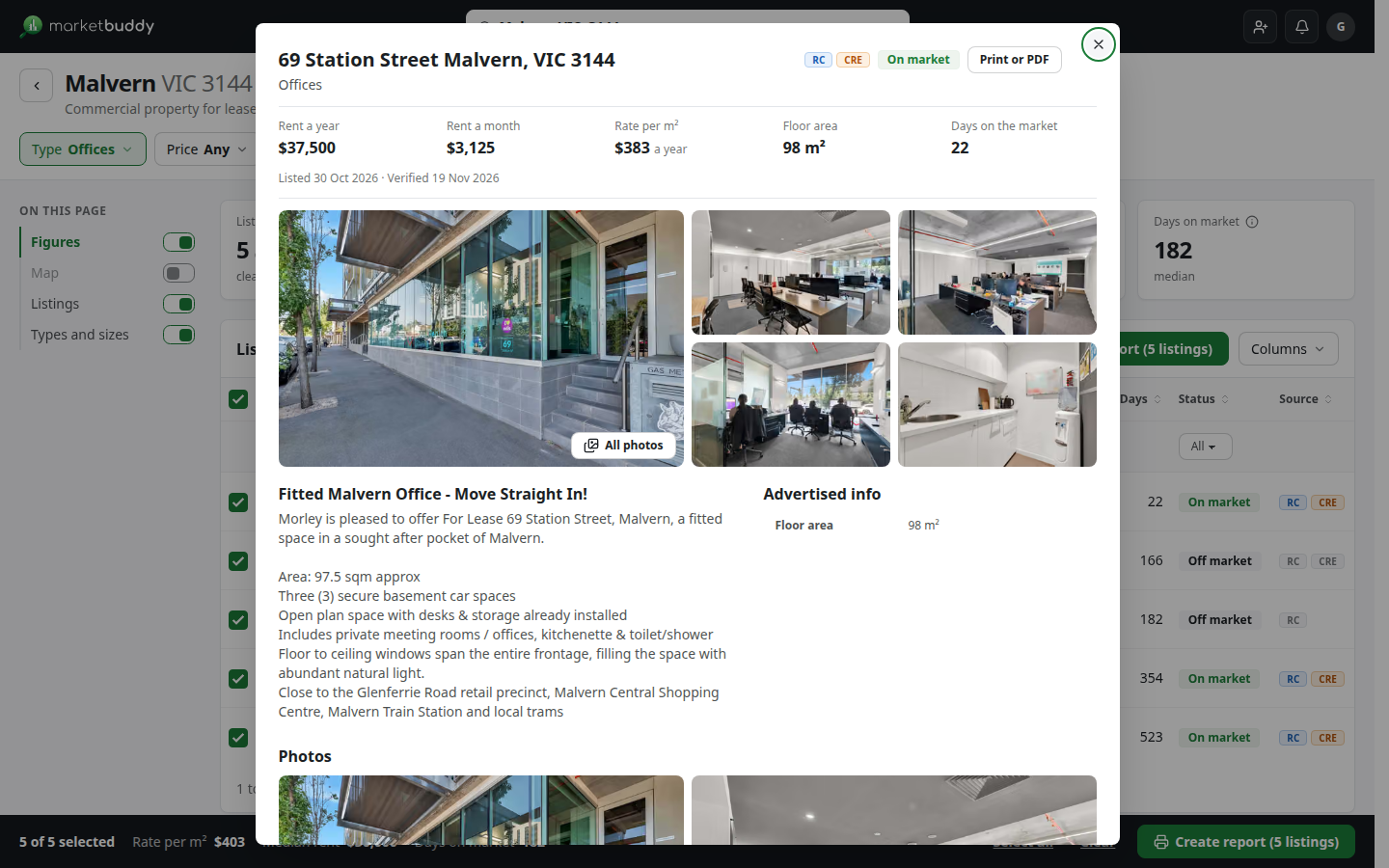
What the details show
| Part | What it shows |
|---|---|
| Heading | The address of the listing, and its property types below. |
| Source links | One link for each portal that shows the listing. RC opens the listing on realcommercial.com.au, and CRE opens it on commercialrealestate.com.au. |
| Status | On market or Off market. |
| Rent a year, Rent a month | The advertised rent. |
| Rate per m² | The rent a year divided by the floor area. |
| Floor area | The floor area in square metres. |
| Days on the market | The days from the date the listing was listed until it left the market, or until today. |
| Listed | The date the listing was first listed. |
| Verified | For an On market listing: the date MarketBuddy last updated the listing from the portals. |
| Off market | For an Off market listing: the date the listing left the market. |
| Photos | The first five photos. Click All photos to go to every photo, and Floor plans to go to the floor plans, when the listing has them. |
| Title and description | The title and the text of the listing, as advertised. |
| Advertised info | The values as the portal gives them: Price, Floor area, Land area, Car spaces, Parking, and Extent. A row shows only when the listing gives that value. |
Without a plan for the state of the listing, the rent, the rate per m², the days on the market, and the source links are locked. See Free trial.
Print the details or save them as a PDF
- In the details window, click Print or PDF. The details open on a page of their own, in a new browser tab.
- On that page, click Print to open the print window of your browser, or click Download PDF to save a PDF file.